Submitting an Activation Request
How to Submit a New Activation Request:
Step 1:
- Click Add AT&T Subscription
- Even if TMO or VZ it will be a bypassed subscription under the AT&T section in our portal
Step 2:
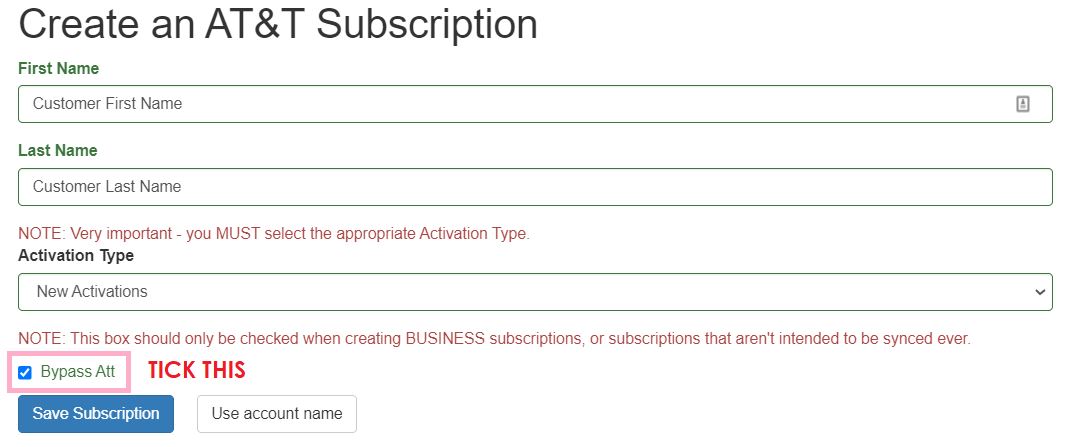
- Add in the customer first name and last name
- Or leave blank and proceed to next step
- Select New Activation on the drop down
- Tick Bypass ATT
- Hit Save Subscription
Step 3:
- Input the Device IMEI and ICCID by clicking Update next to Device ID or ICC ID
- The IMEI must match the IMEI of the device
Step 4:
- Copy the number on the left-hand side that says Sub ID
- Go to your Slack channel and paste the Sub ID's that are ready for activation
- Put the plan type you would like to activate this Sub ID on
- If its multiple Sub ID's on the same plan then just paste the Sub ID's and put the single plan name
- Tag @here to process your activation
Step 5:
- BusinessCore activation team will set it to active once the line is activated and a phone number is generated
- You will receive a Slack message in your channel letting you know your lines are now activated